

Audit season usually starts the same way. A contact center VP gets pulled into a meeting about payment risk, somebody asks whether call recordings ever capture card numbers, IT insists the network is segmented, operations says agents are following the script, and nobody is fully sure where the card data flows.
That's the actual problem with PCI DSS. In a high-volume contact center, the standard doesn't fail because leaders haven't heard of it. It fails because payment handling, agent workflows, call recordings, QA, remote access, and customer experience all collide in the same operation.
For collections, healthcare revenue cycle, financial services, insurance, government, and utilities, the pressure is even tighter. PCI DSS sits next to TCPA, HIPAA, FDCPA, and FCRA. One weak payment process can create compliance exposure across multiple teams at once. The fix isn't more policy binders. The fix is tighter scope, cleaner workflows, and technology controls that remove card data from places it never belonged.
A busy payment floor can look compliant on paper and still be dangerously exposed in practice. Agents are trying to keep call times under control. Supervisors want full recordings for QA. Remote teams need access. Customers want to pay fast and move on. That's where PCI DSS becomes an operational issue, not just a security issue.
A common pattern shows up in regulated contact centers. The organization says it “doesn't store cards,” but agents still hear card numbers over the phone, recordings may still capture payment details, and support teams still have broad access to systems that touch payment workflows. That environment creates audit pain because the process itself keeps pulling card data into places that expand scope.
The pressure isn't abstract. It lands in a few predictable places:
Practical rule: If a contact center depends on agents remembering PCI steps perfectly on every call, the process is already weak.
The strongest payment operations don't treat PCI DSS as a once-a-year validation exercise. They design workflows so card data is isolated, access is narrow, and agents only see what they need to do their job.
PCI DSS applies when an organization stores, processes, or transmits cardholder data. In a contact center, that includes more than the obvious payment terminal. It can include agent desktops, call recordings, QA tools, remote access paths, payment apps, and any connected systems that can affect the security of the cardholder data environment.

Scope is the single most important concept in PCI DSS. If card data touches a system, or if a system can affect the security of the cardholder data environment, that system can end up in scope. That's why sloppy payment handling drives cost and complexity.
A VP in ARM or healthcare billing should push for one question before any audit prep begins: where does card data enter, move, and stop? If nobody can answer that clearly, the organization doesn't have control of scope.
A practical review usually starts with these areas:
The purpose of PCI DSS is simple. Keep cardholder data unreadable, limit who can access it, secure the systems around it, and prove those controls are working.
That's why PCI DSS Requirement 3 matters so much in contact centers. It requires strong protection for stored cardholder data, including industry-accepted algorithms such as AES-256, RSA 2048, or SHA-256, masking that shows only the first or last four digits of the PAN, quarterly purging where storage is unavoidable, and documented protection for cryptographic keys, as outlined in this breakdown of PCI DSS Requirement 3. The message is blunt. If data must exist, it must be unreadable and tightly controlled.
A smaller cardholder data environment is easier to secure, easier to explain, and easier to validate.
The goal isn't to become an expert in every clause. The goal is to reduce how many systems, people, and workflows ever come near card data.
For contact centers, that usually means removing card data from the agent desktop, keeping it out of recordings, and isolating payment workflows from the rest of the operation. Once that happens, PCI DSS requirements stop feeling endless because the environment is no longer sprawling.
A payment call goes wrong in familiar ways. An agent writes down a card number to finish the transaction after a system timeout. A supervisor asks IT for a quick access exception. QA pulls a call recording that should never have contained payment data in the first place. None of that feels dramatic in the moment. It is exactly how PCI scope spreads and how regulated contact centers create audit pain for themselves.
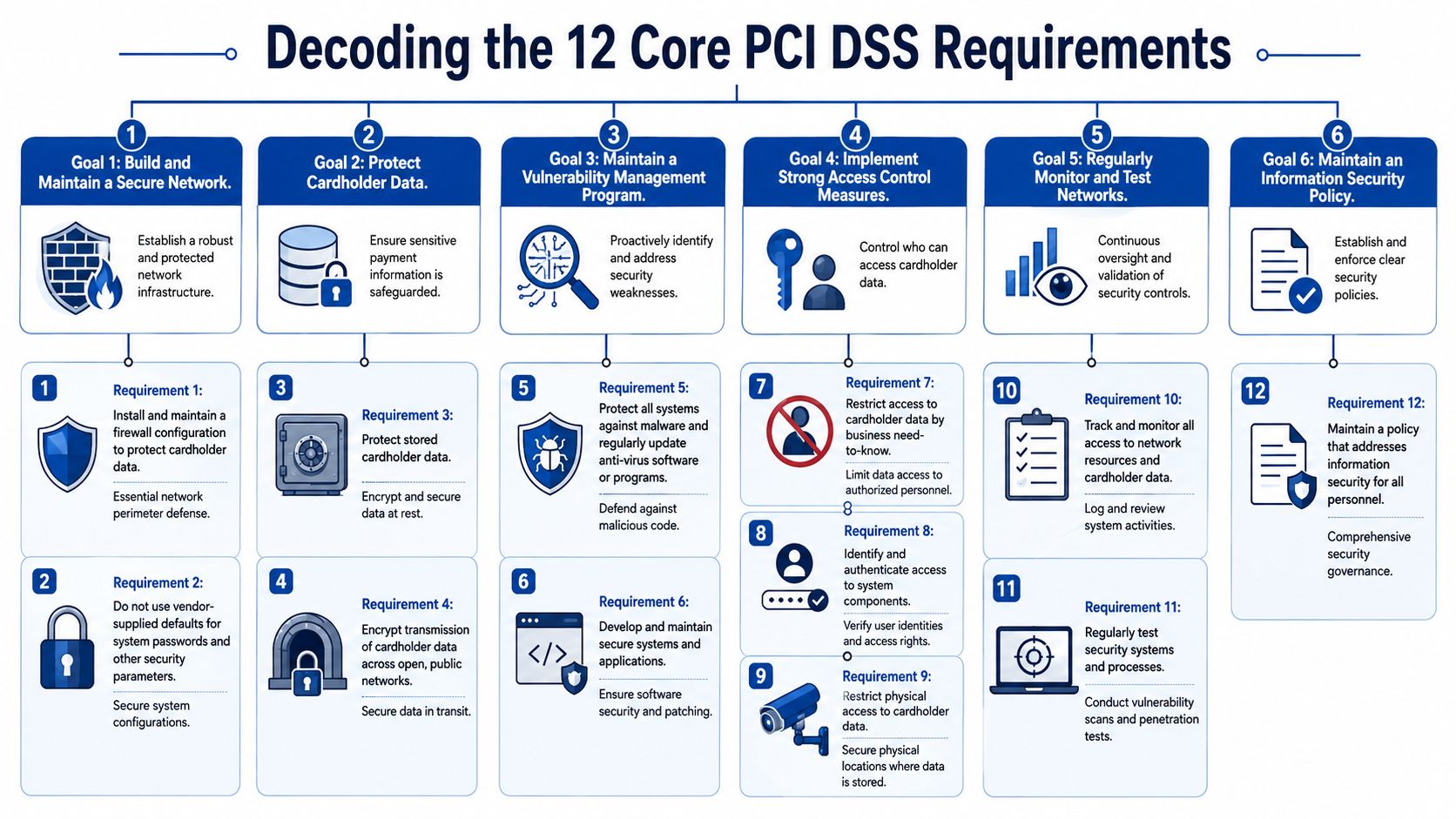
The 12 PCI DSS requirements make more sense when you read them as operating rules, not as an audit checklist. The standard groups them into six security goals. For a contact center VP, each goal answers a simple question. What must be locked down, who can touch it, how is it monitored, and can the team follow the process during a live call?
This starts with Requirements 1 and 2. Use firewalls and security controls to restrict traffic into the cardholder data environment. Remove default passwords, default accounts, and weak baseline settings. In a high-volume contact center, a significant threat is not only an external attacker. It is uncontrolled change. A rushed desktop image, an old remote access rule, or a vendor account nobody disabled can pull ordinary systems into PCI scope fast.
Requirements 3 and 4 focus on the data itself. Protect stored account data. Encrypt cardholder data sent across open, public networks. The official PCI Security Standards Council PCI DSS resources lay out the standard clearly, but the operational point is straightforward. If card data touches recordings, notes, screen captures, chat transcripts, or agent desktops, you created work that security and compliance will spend months cleaning up.
Healthcare and ARM teams feel this pressure harder because they already manage sensitive workflows, complex authentication, and tight quality controls. Adding card data to those same systems without separation is a bad design choice, not just a compliance issue.
Requirements 5 and 6 cover malware protection, secure systems, patching, and application security. In a contact center, that includes agent endpoints, VDI sessions, thin clients, remote devices, payment pages, APIs, and any system that supports the payment flow.
Treat vulnerability management as an operations discipline. Patch windows, change control, endpoint protection, and application testing have to match call volume reality. If your team delays fixes because downtime is painful, build maintenance around the payment workflow before an assessor forces the issue.
PCI breaks down in contact centers when security controls are designed without regard for live call handling, exception queues, and remote agent support.
Requirements 7, 8, and parts of 12 expose whether access control is real or just written down. Access must be based on job role. Users need unique IDs. Authentication has to be strong enough to hold up under internal and external scrutiny.
For contact centers, this means supervisors do not get broad payment access by default. QA should not be able to reach payment systems because they review calls. IT admins should not share credentials for convenience. Multi-factor authentication needs to cover every user who can reach the cardholder data environment, including internal users and support personnel. Shared logins are an audit finding waiting to happen.
For teams tightening payment workflows, secure payment processing in the contact center should keep authentication, payment handling, and audit trails aligned inside the process instead of scattered across separate systems.
Requirements 10 and 11 are where many programs get lazy. Logging is not enough. Review matters. Testing matters. If your team cannot show who accessed payment systems, what changed, what failed, and how quickly it was addressed, you have weak control even if the tool technically captured an event.
This is especially important in distributed contact centers. Remote agents, outsourced support, and after-hours administration create blind spots. Logs need ownership. Vulnerability scans need follow-through. File integrity monitoring, penetration testing, and control validation have to connect back to actual payment workflows.
Requirement 12 ties the program together. Policies have to match the way calls are handled on the floor. If a payment policy only works in a conference room and fails during a rushed collections call or a patient billing dispute, the policy is defective.
Train people on the moments that create exposure. Call transfers. failed payments. manual retries. supervisor escalations. screen sharing. pause-and-resume failures. Those are the places where PCI control either holds or collapses.
A practical way to read the 12 requirements in a contact center is this:
| Goal | What it means in daily operations |
|---|---|
| Build and maintain secure systems | Harden payment-related systems, control network paths, and stop configuration drift |
| Protect cardholder data | Keep card data out of desktops, recordings, notes, and other general-use tools |
| Manage vulnerabilities | Patch, test, and protect endpoints and apps that support the payment process |
| Control access | Limit access by role, require unique accounts, and enforce MFA |
| Monitor and test | Review logs, test controls, and catch failures before an assessor does |
| Maintain policy and training | Write procedures agents and supervisors can actually follow during live calls |
The standard is broad. Your job is not. In a high-volume contact center, the winning approach is to keep payment data contained, keep access tight, and make the payment process work cleanly under real call pressure.
A lot of teams waste time here because they treat validation as a paperwork choice. It isn't. The validation path reflects how the organization handles card data and how much assessor scrutiny the environment requires.
A Self-Assessment Questionnaire (SAQ) is generally the route for organizations that qualify to validate by self-assessment. A Report on Compliance (ROC) is a formal assessment conducted by a Qualified Security Assessor. The wrong assumption is that SAQ means easy. It doesn't. It only means the organization's environment may fit a self-assessment path.
The decision point is exposure. If the contact center's payment process is tightly controlled, with card data isolated from agent desktops and supporting systems, validation is usually cleaner. If card data spreads into recordings, notes, workstations, or custom workflows, the assessment burden rises fast.
A messy payment process doesn't stay a process problem. It turns into a validation problem.
A VP shouldn't ask only, “Which form is required?” The better question is, “Did the payment design create more assessment work than necessary?”
| SAQ Type | Eligibility | Example Use Case |
|---|---|---|
| SAQ A | Card-not-present environments that fully outsource card data handling and don't store, process, or transmit cardholder data on their own systems | A contact center using a fully outsourced payment page or secure payment channel that keeps card data off internal systems |
| SAQ A-EP | E-commerce environments that outsource payment processing but still have websites that can affect the payment transaction | An online billing portal managed internally that redirects customers into a separate payment process |
| SAQ B | Limited environments using imprint machines or standalone dial-out terminals with no electronic card data storage | A highly limited payment setup outside a typical modern contact center workflow |
| SAQ B-IP | Payment environments using standalone IP-connected terminals with no electronic card data storage | A front-desk or payment kiosk setup using isolated IP terminals |
| SAQ C-VT | Merchants using web-based virtual terminals on isolated computers with no electronic card data storage | A small payment team keying transactions into a browser-based terminal on locked-down workstations |
| SAQ C | Merchants with payment application systems connected to the internet but not storing electronic cardholder data | A limited in-house payment application used by staff in a controlled segment |
| SAQ D | Environments that don't fit the narrower SAQ types, or have broader card data exposure | A contact center where multiple systems, users, or workflows can affect cardholder data security |
Three mistakes show up repeatedly:
A disciplined contact center keeps payment capture contained, strips card data out of the broader workflow, and then validates against the existing environment. That's what keeps the SAQ or ROC discussion honest.
A collector is on a live call. The customer is ready to pay. The agent is trying to keep the conversation moving, the recording is running, the desktop has five open systems, and a supervisor is monitoring the interaction. That is the moment PCI control either holds or fails. In a high-volume contact center, especially in ARM and healthcare, compliance breaks inside ordinary workflows, not during the audit.

Policy will not save you if the workflow still depends on agents hearing, repeating, typing, or correcting card numbers. The control has to sit inside the payment process itself.
Tokenization should be the default. Replace card data immediately with a token that has no value outside the approved payment context. That lets teams handle reconciliation, recurring payments, and post-call follow-up without pushing account numbers through notes, recordings, desktops, or downstream systems.
Agent-assisted payments should take the agent out of card capture. Let the customer enter payment details through a secure channel while the agent stays on the call and gets status only. That design cuts risk in several places at once. It protects the recording environment, limits desktop exposure, reduces training mistakes, and gives auditors a cleaner story.
A controlled payment flow usually works like this:
That is the standard to aim for. If agents can still hear or see full card numbers, your process is carrying more risk than it should.
Payment permissions spread unnoticed in busy centers. A supervisor needs temporary visibility. QA wants access for reviews. IT support needs admin rights. Before long, too many people can touch payment functions, and no one can explain why.
Requirement 7 is plain on this point. Access must be based on business need to know. In practice, that means separating who can initiate payment activity, who can view payment status, who can administer systems, and who can review logs. Those roles should stay separate even when staffing is tight.
For teams reviewing controls around desktops, recording, authentication, and remote work, contact center security architecture should be part of the payment design from the start. If you wait until after rollout, operations will build exceptions around the gaps.
“The safest payment call is the one where the agent never hears or sees the card number at all.”
A unified platform becomes critical in this context. When voice, payment handling, notes, authentication, and recordings sit in separate tools, teams create extra handoffs and extra failure points. Each handoff adds another place where card data can be exposed, misrouted, or retained longer than intended.
A platform such as Intelligent Contacts keeps communication and payment in one workflow, which helps reduce the number of systems involved in payment activity and makes control enforcement more consistent.
That matters in regulated contact centers because payments rarely happen as standalone events. In ARM, they sit inside disputes, settlement discussions, and payment plans. In healthcare, they follow identity checks, coverage questions, and balance explanations. If payment security is bolted on at the end, agents feel the friction first, and risky workarounds show up fast.
Some practices create PCI problems every day:
Good PCI implementation does not slow the floor down. It removes fragile manual steps, contains card exposure to a narrow process, and lets agents focus on resolving the account instead of juggling compliance workarounds.
A collector is on a live call, takes a payment, and the card data passes through the agent desktop, the softphone, the call recording stack, a QA tool, and two support systems nobody included in the last audit. That is how PCI scope gets out of control in a contact center. Not from one bad control, but from a payment workflow that was never contained.

Segmentation means cardholder data stays inside a tightly defined environment with clear technical boundaries. The practical goal is simple. Keep payment traffic, payment systems, and payment administration away from the rest of the floor.
That matters even more in ARM and healthcare, where payment activity sits inside longer conversations. Agents move between identity checks, account research, dispute handling, balance explanations, and payment collection in one session. If the environment is not segmented, all the connected tools around that call start drifting into scope.
Requirement 4 deals with protecting card data during transmission over open, public networks. In practice, contact centers miss the bigger operational point. Encryption in transit is only part of the job. You also need enforced separation, controlled access, and monitored boundaries so payment data does not spill into general systems.
Start with the payment path. It should be distinct from the normal agent workflow, with as few systems in the middle as possible.
A workable model usually includes:
For teams reviewing capture methods, point-to-point encryption and payment isolation should be part of the scoping decision. If card data is encrypted at the point of capture and routed through an isolated payment process, you cut down the number of systems, users, and recordings that can pull you back into scope.
Operational takeaway: The easiest PCI assessment is the one where the assessor can clearly see what is in scope, what is out of scope, and why.
Be blunt about this with leadership. Every system that touches card data creates work. More evidence to gather. More access to review. More exceptions to explain. More findings to fix.
A smaller cardholder data environment lowers audit effort, but that is not the main win. The main win is operational control. Security teams can monitor a narrower area. IT can manage fewer sensitive connections. QA and training teams spend less time cleaning up bad payment handling habits. Agents get a cleaner workflow that does not depend on memory or manual steps.
In high-volume contact centers, scope discipline is what keeps PCI from turning into an operations tax.
PCI compliance doesn't hold if the organization treats it like a yearly event. Controls drift. Access expands. New workflows get added. Remote support exceptions pile up. Then audit prep starts and everyone scrambles to prove that the environment is still under control.
The contact centers that stay in shape build PCI into daily operations. They monitor access, review role changes, keep payment handling out of agent memory and recorded channels, and revisit workflow changes before they become scope problems.
That operating model matters more in regulated industries because PCI rarely stands alone. In collections, healthcare revenue cycle, financial services, insurance, government, and utilities, a payment workflow can also affect call handling, privacy exposure, record retention, and customer dispute management. A weak design creates downstream trouble fast.
A practical next step is to review the payment journey end to end. Check where customers enter card data, what agents can see, what systems record, who has access, and whether any part of the process relies on staff remembering manual steps. If it does, there's still work to do.
For organizations that want fewer moving parts, Intelligent Contacts provides a unified contact center and payments platform built for regulated environments. Voice, SMS, email, chat, and secure payments run in one workflow, with clear integration paths and implementation in days, not weeks. To see how a tighter payment workflow can reduce PCI burden without slowing operations, Schedule a Demo or See Your ROI. Contact the team at Intelligent Contacts to discuss contact center security, payment workflows, and compliance requirements.