

The problem usually isn't that a contact center has no process. It's that the process breaks the moment a real customer does something messy. A patient wants to dispute a balance and make a partial payment. A borrower calls back on a different channel after getting an SMS. An agent can explain the next step but can't complete it without opening three systems and transferring the interaction to payments.
That's not a workflow. That's operational drag with compliance exposure attached.
In regulated industries, a contact center workflow has to do more than move conversations through queues. It has to control disclosures, preserve context, govern decision rights, and get from communication to resolution, including payment, without creating audit gaps. If it can't do that, it's decoration.
A contact center workflow is the operating logic behind every interaction. It decides what happens when a customer calls, texts, emails, chats, verifies identity, asks for an exception, needs escalation, or wants to pay. It governs the sequence, the rules, the handoffs, and the record of what happened.
What it is not. It is not a script. It is not a swimlane diagram that lives in a slide deck. It is not a queue rule that sends calls to whoever is available next.
Most workflow failures look familiar.
That's where cash flow stalls and compliance risk shows up.
A useful baseline is call volume, because workflow design starts with the amount of demand the operation has to absorb. One 2025 benchmark says the average call center handles roughly 4,400 calls per month, and 61% of call center leaders reported higher call volume than in 2020, according to this call center statistics review. Higher volume changes everything. Staffing, routing, queue design, and self-service all become workflow problems, not just labor problems.
Practical rule: If a workflow only explains how to answer the interaction, but not how to complete the work, it isn't finished.
A real contact center workflow does four things at once:
That last part matters more than is often acknowledged. “Handled” is not the same as “resolved.” In collections, healthcare revenue cycle, utilities, and financial services, the workflow has to carry the interaction all the way to a compliant outcome.
A static process map tells the team what should happen in theory. A live workflow tells the system and the agent what happens next in practice.
| Static process map | Live workflow |
|---|---|
| Documents a process | Executes a process |
| Looks clean in workshops | Handles exceptions in production |
| Depends on memory | Embeds rules in the system |
| Stops at agent action | Tracks completion and next step |
That's the shift. A contact center workflow is no longer a support artifact. It's the control layer for communication, compliance, and revenue movement.
A modern contact center workflow needs structure. Not generic “omnichannel capability.” Real components with clear jobs. In regulated environments, each component has to improve resolution while reducing the chance that the operation drifts out of policy.
The architecture below shows the basic shape.
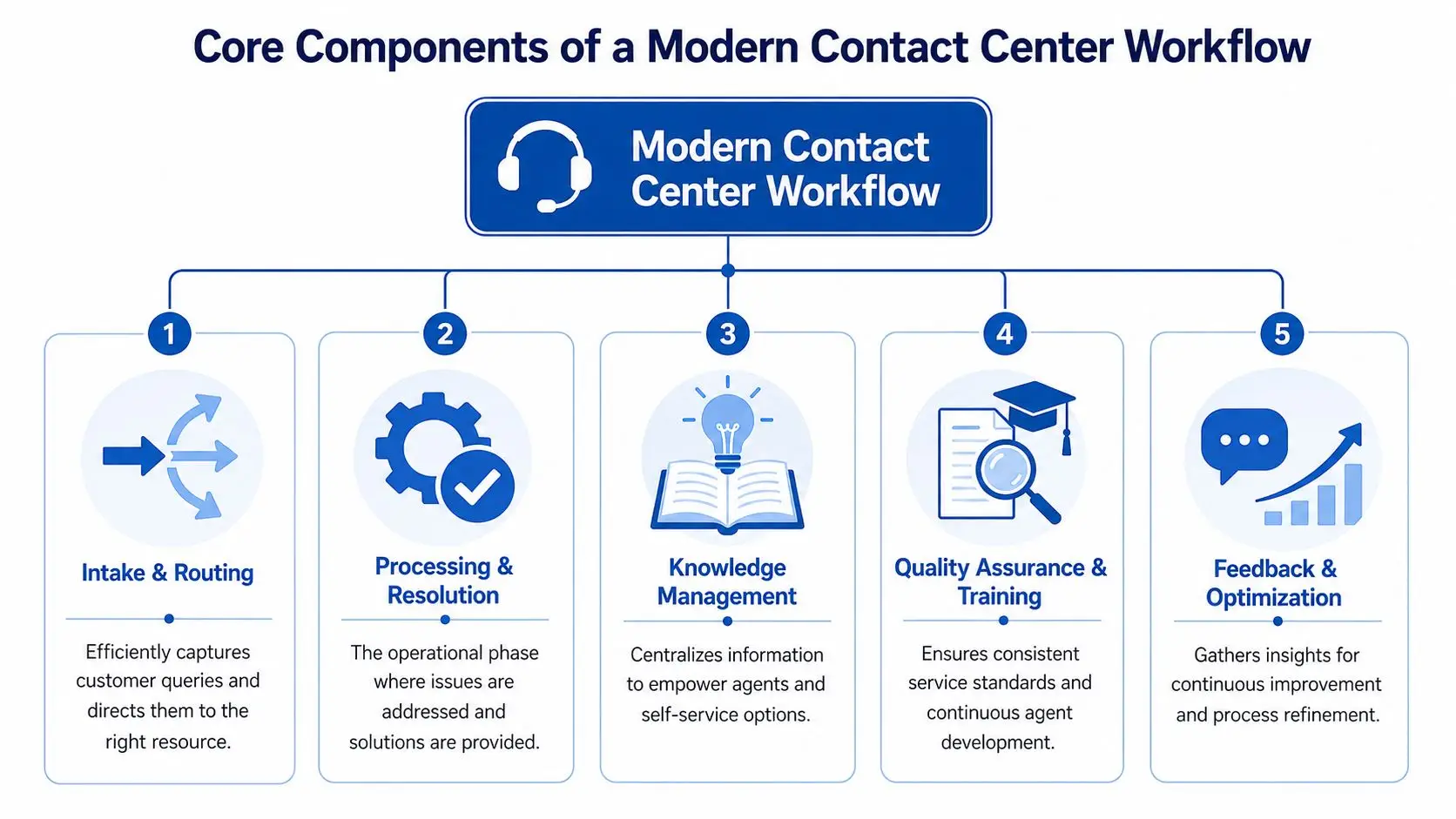
The first decision in a workflow is where the interaction goes and why. Too many teams still route on availability first. That's how simple calls land with the wrong people and complex calls bounce between departments.
Skills-based routing is the better baseline when it reflects customer intent, profile complexity, language, and priority. Verified benchmark data shows that when routing matches the customer to the agent best equipped to resolve the issue, First Contact Resolution improves by 15–25%. That works because the workflow pulls in the context the agent needs from systems such as CRMs and EHRs and presents the right guidance at the moment of interaction.
If routing ignores those variables, the rest of the workflow starts at a disadvantage.
Once the interaction lands with the right resource, the workflow has to support completion. This is the part frequently under-designed.
An agent shouldn't have to improvise which fields to update, which disclosure to read, when to escalate, or how to document proof of completion. The workflow should define those steps in order. In collections, that may mean right-party verification, disclosure handling, account review, settlement or payment-plan logic, payment capture, and documented outcome. In healthcare revenue cycle, it may mean patient identification, balance review, benefits clarification, payment options, and a secure payment path.
The best workflow reduces judgment where compliance requires consistency, and preserves judgment where resolution requires discretion.
Knowledge has to sit inside the workflow, not off to the side. A separate knowledge base that agents have to search manually becomes a delay engine.
A workable model gives the agent contextual guidance based on the interaction type. If the issue involves a payment dispute, the workflow should surface the exact disposition options, approved scripts, allowed offers, and escalation thresholds. If the issue touches HIPAA or PCI-DSS, the workflow should narrow the path, not widen it.
That means guidance should be:
Quality assurance can't just score the end result. It has to verify whether the workflow itself is helping or harming execution.
Three questions matter:
When quality teams review interactions against the workflow logic, they stop treating every miss as an agent coaching issue. Sometimes the problem is bad workflow design.
A modern contact center workflow should improve over time. That only happens when operations leaders treat workflow changes as controlled system updates, not ad hoc fixes.
A sound optimization loop reviews:
The point isn't to make the workflow shorter at any cost. The point is to make it easier to resolve the right issue in the right way.
Many teams don't have an AI problem. They have an orchestration problem.
The market has moved fast. A 2026 industry review says 88% of organizations are deploying AI at scale, but only about 25% have operationalized it in day-to-day workflows, according to this contact center AI analysis. That gap explains why so many contact centers have pilots, demos, and scattered features, but very little operational lift.

Automation should handle repetitive, low-risk, high-frequency work. That includes routine intake, confirmations, reminders, status checks, common follow-ups, and secure self-service steps. It should not be dropped blindly into conversations that involve exceptions, emotional escalation, or sensitive financial and health decisions.
That's why human-in-the-loop design is the right model. Automation handles availability, routing, and routine execution. Human agents handle the interactions that require judgment, empathy, negotiation, or exception management.
A well-built contact center workflow uses automation in specific places:
In a collections or patient billing workflow, that means a customer can move from reminder to engagement to secure payment without dropping out of the process. That is where workflow design starts affecting cash flow directly.
A lot of AI deployments fail because they sit beside the workflow instead of inside it. Summaries, prompts, and analytics are useful, but they don't fix a broken handoff between communication and payment.
A better model gives AI a defined role in the workflow. For example, an autonomous collection agent can handle certain account types, follow approved communication logic, escalate edge cases, and move resolved accounts into payment or follow-up steps. That's closer to operational value than generic assistant features. Teams evaluating this shift can use a practical framework from what makes a contact center truly AI-driven.
AI earns its place when it removes repeatable work from trained staff without creating a compliance blind spot.
One example is Grace, an AI collection agent built to participate directly in collection workflows instead of acting as a detached add-on. That matters because regulated operations need AI behavior tied to rules, permissions, and auditable outcomes.
Most contact centers still optimize for speed first. That's the wrong target.
A fast interaction that ends in a transfer, a callback, or a missed payment isn't efficient. It just hides the cost by pushing the work downstream. The better design principle is resolution first. If the workflow doesn't let the frontline team complete the issue, the operation keeps paying for the same contact center workflow failure over and over.
The strongest framework is simple and operational. For every high-volume issue, define the data, decision rights, required systems, exceptions, and proof of completion. That principle is laid out well in this contact center workflow design guide. It matters because First Contact Resolution depends on whether the agent can finish the work, not whether the interaction moved quickly.
That means a workflow should answer questions like these:
If those answers aren't explicit, the workflow is relying on luck.
Most regulated contact centers already know where interactions get slow. However, many teams don't redesign those breakpoints aggressively enough.
The most common failure points look like this:
| Breakpoint | What usually happens | What the workflow should do |
|---|---|---|
| Identity verification | Agent repeats questions manually | Verify once, carry status forward |
| Account review | Agent toggles between systems | Surface balances, notes, and history in one workspace |
| Payment discussion | Customer gets transferred | Keep payment inside the same workflow |
| Exception handling | Agent waits on supervisor | Define decision thresholds in advance |
The payment discussion is where many workflows collapse. A customer has intent to resolve. The agent has momentum. Then the process introduces a handoff, another queue, or a different payment system. That's operational waste.
This is the recommendation that matters most in collections, healthcare revenue cycle, financial services, and utilities. Stop treating payment as a separate workflow. Payment is often the resolution event. If it lives outside the main interaction flow, teams create delay, increase abandonment risk, and add compliance exposure.
A practical design standard is:
That requires workflow logic beyond call handling. Teams that are modernizing the surrounding system environment can also review how CRM workflow automation supports cleaner data movement, trigger logic, and follow-up control.
A workflow should move the customer toward resolution, not toward another department.
The best workflow updates come from hard evidence. Operations leaders should review repeated contacts, abandoned payment attempts, policy exceptions, and supervisor interventions by issue type. Then they should fix the underlying workflow path.
That's how a contact center workflow starts acting like an operating system instead of a collection of scripts.
Regulated operations don't need more abstraction. They need workflows that survive real calls, real disclosures, real exceptions, and real payment conversations.
The most useful design pattern is bounded automation. The workflow automates the predictable parts, but it keeps clear controls around payments, sensitive data, disclosures, and exceptions. That approach aligns with this standardization guidance for regulated workflows, which points toward tightly governed processes instead of automation for its own sake.
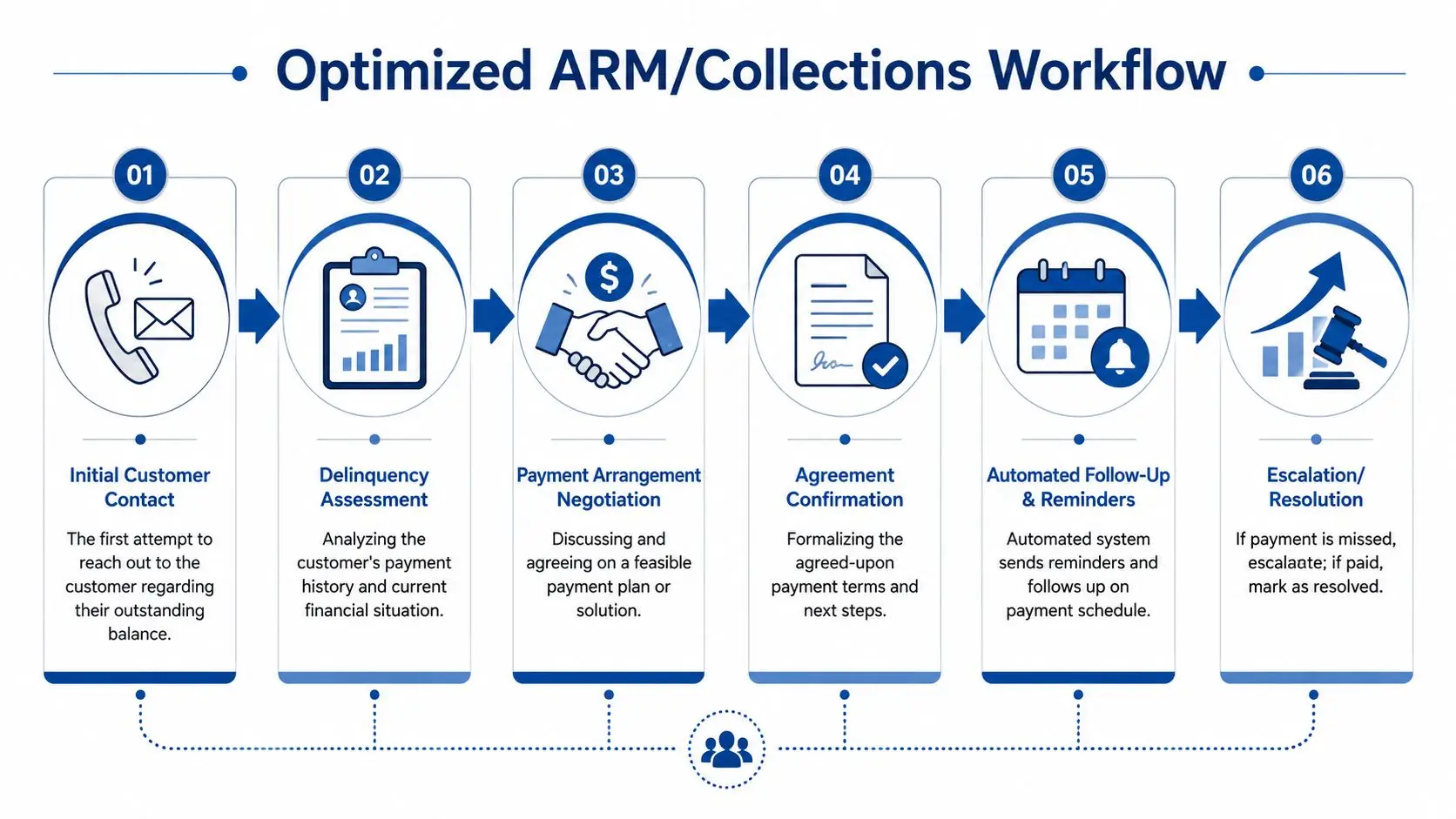
A strong collections workflow doesn't just increase talk time efficiency. It creates a defensible path from outreach to payment while honoring TCPA, FDCPA, FCRA, and PCI-DSS requirements.
A typical sequence looks like this:
Initial outreach control
The system applies channel rules, time-of-day restrictions, and account-level communication permissions before the message goes out.
Right-party verification
The workflow confirms identity before account-specific discussion begins.
Disclosure management
Required language appears at the right point in the interaction. It isn't left to memory.
Resolution path selection
The agent or approved automated path offers payment in full, arrangement options, or escalation for dispute and hardship handling.
Secure payment capture
Payment occurs inside a PCI-DSS controlled flow, not through a loose handoff.
Proof of completion and follow-up
The system logs outcome, next step, and any reminder schedule.
Communication and payment need to coexist. If they don't, the account stays open longer than necessary.
Healthcare workflows carry a different risk profile. HIPAA and PCI-DSS shape the design, and the interaction often mixes empathy, billing confusion, benefits questions, and payment sensitivity.
A practical patient billing workflow often includes:
The key isn't just standardization. It's using one controlled process so staff don't improvise around protected health information or payment data.
In regulated environments, consistency is a risk control, not a management preference.
| Industry | Primary workflow goal | Key compliance focus | Critical KPI |
|---|---|---|---|
| ARM and collections | Move from contact to payment or arrangement | TCPA, FDCPA, FCRA, PCI-DSS | Promise kept, payment completion, dispute handling quality |
| Healthcare revenue cycle | Resolve billing questions and collect securely | HIPAA, PCI-DSS | Balance resolution, payment completion, repeat billing contacts |
| Financial services | Handle service and collections with controlled permissions | TCPA, PCI-DSS, internal policy controls | Secure completion, exception rate, repeat contact rate |
| Insurance | Resolve claim or premium issues without context loss | PCI-DSS, privacy controls | Resolution quality, handoff rate, payment completion |
| Government and utilities | Manage volume while preserving rule-based treatment | TCPA, payment security, agency rules | Queue containment, payment completion, escalations |
The pattern is consistent. The workflow has to unify communication, decisioning, and payment under one governed process.
A contact center workflow should be judged by business outcomes, not vanity metrics.
Average handle time has a place, but it often gets too much authority. A short call that triggers rework, causes payment abandonment, or creates a compliance exception is not a win. The useful KPI set should show whether the workflow reduces avoidable contacts, completes more work in one pass, and moves money faster without raising risk.
The most practical KPIs are the ones that connect communication activity to operational value.
Automation merits close examination. Verified benchmark data shows that automating repetitive workflows through IVR and automated response templates can reduce inbound call volume by 20–35%, and PCI-DSS certified self-service payment portals can reduce inbound payment calls by 40%. Those are operational outcomes, not cosmetic ones.
A unified reporting view matters because disconnected systems hide the cause-and-effect relationship between outreach, conversation, and payment.
A good scorecard doesn't just track totals. It tells operations where the process breaks.
| KPI | What it reveals |
|---|---|
| Repeat contact by issue type | Which workflows fail to resolve the issue |
| Payment abandonment point | Where customers drop during payment steps |
| Supervisor intervention rate | Where frontline authority is too narrow |
| Self-service containment | Which routine requests should stay out of live queues |
Teams that want a sharper KPI model can review six contact center KPIs leaders track closely.
The right measurement discipline changes the conversation. Instead of asking whether the queue moved faster, leadership starts asking whether the workflow reduced cost, protected compliance, and accelerated revenue.
Most contact centers don't start from zero. They start from a stack of separate tools, workarounds, manual exports, and “temporary” processes that somehow became permanent.
That stack creates two problems. First, agents waste time moving between systems. Second, compliance controls become inconsistent because communication, documentation, and payment happen in different places. The fix is not another overlay. The fix is a unified platform with clear integration paths to the existing CRM, EHR, billing system, or account database.
A workable migration plan is straightforward.
Map current workflows
Identify the high-volume interaction types, the handoffs, the payment steps, and the compliance checkpoints.
Define system-of-record responsibilities
Decide which platform owns account data, which owns communication execution, and where payment confirmation writes back.
Configure workflow logic first
Build routing, disclosures, permissions, exception paths, and payment steps before broad rollout.
Test with real scenarios
Use common call types, disputed balances, partial payments, wrong-party contacts, and escalation cases.
Roll out in controlled phases
Start with the workflows that create the most friction or revenue delay.
That process shouldn't drag on endlessly. With clean integration paths and a focused scope, implementation can move quickly. Teams replacing fragmented infrastructure can look at one unified contact center and payments platform as a reference point for how voice, SMS, email, chat, workflow logic, and secure payments can sit inside one environment rather than across a reseller stack.
Operations leaders should ask blunt questions.
If the answer to any of those is unclear, the migration plan is weak.
The goal isn't to buy a prettier interface. The goal is to remove the operational seams that slow collections, frustrate patients and customers, and create preventable compliance exposure.
A unified workflow changes more than queue management. It gives regulated organizations one place to control communication, documentation, routing, and payment from first contact to final resolution. Intelligent Contacts supports that model with a unified contact center and payments platform built for compliance-heavy operations. For teams ready to replace a fragmented stack, Schedule a Demo or See Your ROI. Contact Intelligent Contacts at (123) 456-7890.