

A contact center manager in a regulated environment usually knows the pattern by heart. Agents handle calls in one screen, look up account history in another, send a text from a separate tool, then swivel to a payment app that doesn't share context with the first three. Every handoff slows the interaction. Every screen change creates another chance to miss a disclosure, mishandle card data, or lose a willing payer.
That's why call center CRM software matters now in a different way than it did a few years ago. This isn't just about cleaner workflows or nicer dashboards. It's about whether a collections team, healthcare revenue cycle department, financial services contact center, insurer, utility, or government operation can keep communication, documentation, and payment activity inside one controlled process.
The problem usually isn't effort. It's architecture.
A typical regulated contact center asks agents to do too much manual coordination. They confirm identity, review account notes, check prior outreach, manage consent status, handle objections, and, if the customer is ready, take payment. If those steps live across disconnected systems, the agent spends the interaction stitching together a workflow the platform should've handled.
In collections and healthcare billing, this shows up fast. The customer says they're ready to resolve the account. The agent has to open a separate payment system, re-authenticate, re-enter account details, and hope call recording controls are handled properly before card information comes into the conversation. That's not a training problem. That's a systems problem.
The same thing happens with outbound communication. One system controls dialer activity, another stores notes, and a third tracks payments or promises to pay. By the time a supervisor audits the interaction, the full history exists nowhere in one place.
Practical rule: If an agent has to remember which screen is safe for which action, the platform isn't doing its job.
The market is moving away from that model. The contact center software market is projected to grow from USD 72.86 billion in 2025 to USD 184.24 billion by 2031 at a 16.72% CAGR, driven by the shift from fragmented systems to unified, AI-orchestrated platforms.
The first symptom is usually frustration. The second is inconsistency.
Agents don't burn out because they dislike customer conversations. They burn out because routine work takes too many clicks, too many workarounds, and too much guesswork. In a high-volume operation, that turns into longer handle times, uneven quality, and missed opportunities to complete a payment or resolve an issue on the first contact.
A manager sees the downstream effects in places like:
A lot of teams think they need better agents. Most need better workflow design inside the software they already depend on every minute.
Unified call center CRM software isn't just a customer database with phone integration attached. In regulated operations, it's the system that keeps communication, account context, workflow controls, and payment activity inside one governed environment.
The easiest way to think about it is this. A fragmented stack is a toolbox dumped on the floor. A unified system is a workbench where every tool is already in the right place, with the right guardrails, before the work starts.
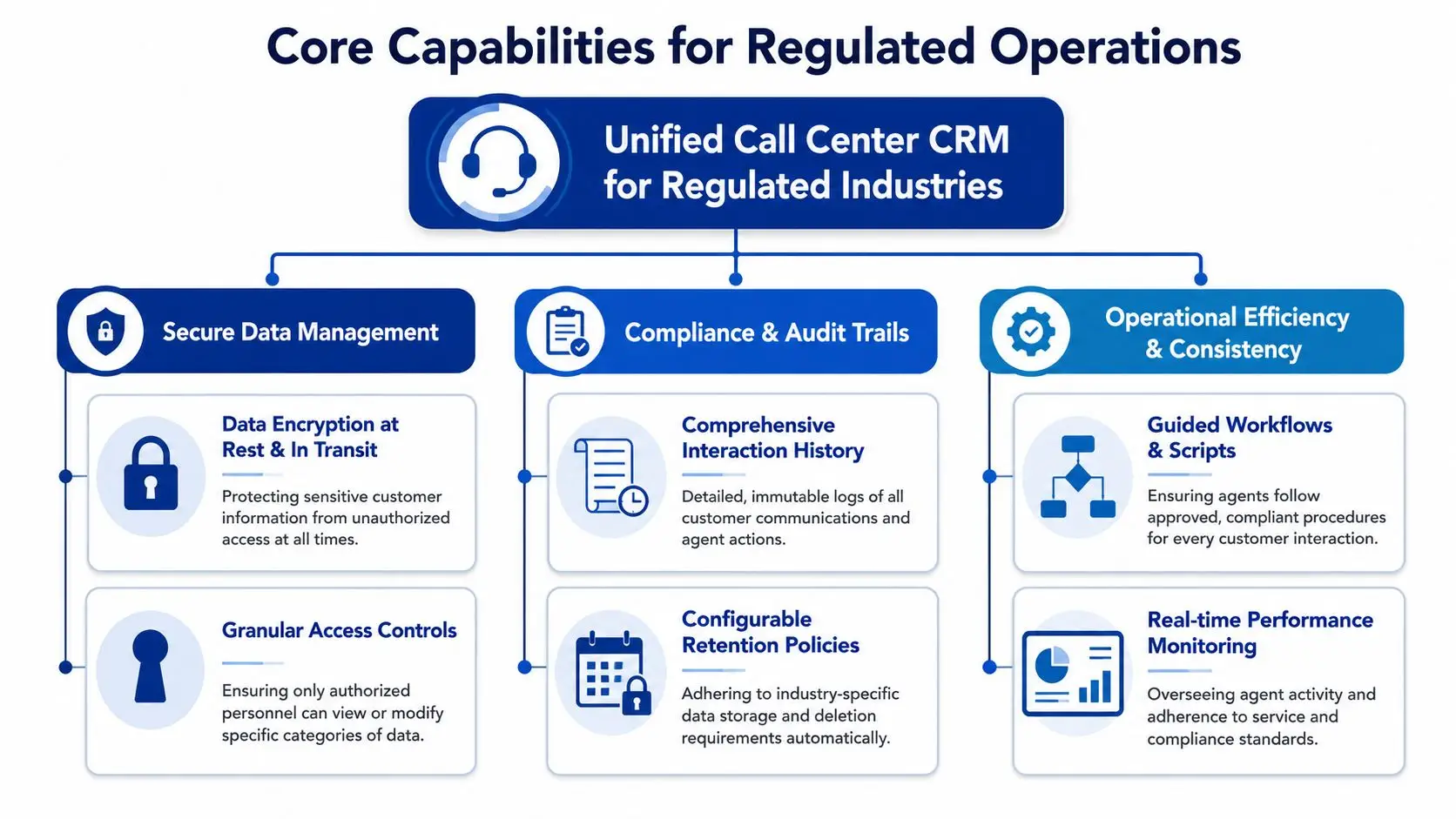
A true unified platform pulls the operational pieces together so the agent doesn't have to.
That means the agent can work from a single record that includes prior calls, texts, emails, notes, payment status, dispute history, and workflow prompts. It also means the system controls what happens next. Routing, scripting, documentation, and secure handoff to payment all occur inside the same process.
For teams comparing deployment models, it helps to understand what CCaaS means in practical terms for modern contact center operations.
The biggest difference between a unified system and a patched-together one is context.
When communication channels share one customer profile, the agent doesn't waste time reconstructing the story. According to industry benchmarks on native omnichannel orchestration, CRMs with native orchestration achieve 30% higher first-contact resolution, reduce agent screen-switching by up to 40%, and cut average handling time by 15% to 25%.
That's not a cosmetic improvement. In regulated industries, fewer handoffs mean fewer chances to lose track of consent, misread account status, or force a customer to repeat sensitive information.
In practical terms, unified call center CRM software should support:
A regulated contact center doesn't need more features. It needs fewer gaps between the features that already matter.
If the CRM only stores notes while separate tools run communication and payment, that's not unified. It's just central storage sitting next to operational risk.
Buyers in regulated industries shouldn't start with a long feature checklist. They should start with a short question. Can the platform support compliant, repeatable communication from first outreach to final resolution without forcing agents to leave the workflow?
That question strips away a lot of marketing noise.
Voice, SMS, email, chat, and self-service only work together when the context carries over. If a patient starts in a text conversation, moves to a live call, and then pays through a portal, the history should remain continuous.
Without that continuity, agents fall back on manual note-taking and memory. In collections, that creates inconsistent treatment. In healthcare, it creates billing confusion. In financial services and insurance, it causes repetitive verification and longer calls.
A strong call center CRM doesn't just display data. It guides the next action.
That includes approved scripts, dispute handling paths, settlement or payment-plan logic, callback scheduling, and escalation rules. Good workflow control reduces variance between agents and gives supervisors a cleaner standard for coaching and QA.
A practical review should look for these operational controls:
High-volume contact centers can't afford to send every interaction to a live agent.
The platform should route based on account status, language, queue logic, and business rules. IVR and self-service should handle routine actions cleanly, including balance checks, payment options, and basic account requests. That doesn't remove agents from the process. It reserves agent time for exceptions, negotiation, and accounts that need judgment.
AI matters when it has access to complete account history and operational rules that drive the interaction. It fails when it sits outside the workflow and guesses from incomplete data.
For regulated teams, the right use cases are narrow and practical. Handling routine outreach, summarizing interactions, surfacing next-best actions, and supporting common payment or account tasks all make sense. Generic AI that lacks account context usually creates rework.
In regulated contact centers, useful automation doesn't sound smart. It follows the rules every time.
Many CRM evaluations fall apart at this stage.
A lot of platforms handle communication well enough. Fewer handle payment activity inside the same controlled workflow. That distinction matters because payment is the point where compliance, customer experience, and revenue all converge.
When the agent has to leave the CRM to process payment, several things go wrong at once. The interaction loses continuity. Auditability gets weaker. Recording controls become harder to manage. The customer experiences friction at the exact moment the organization needs resolution.
The best architecture keeps communication and payment in one workflow. For collections, healthcare revenue cycle, utilities, and financial services, that's not a nice extra. It's the operating model that prevents avoidable mistakes.
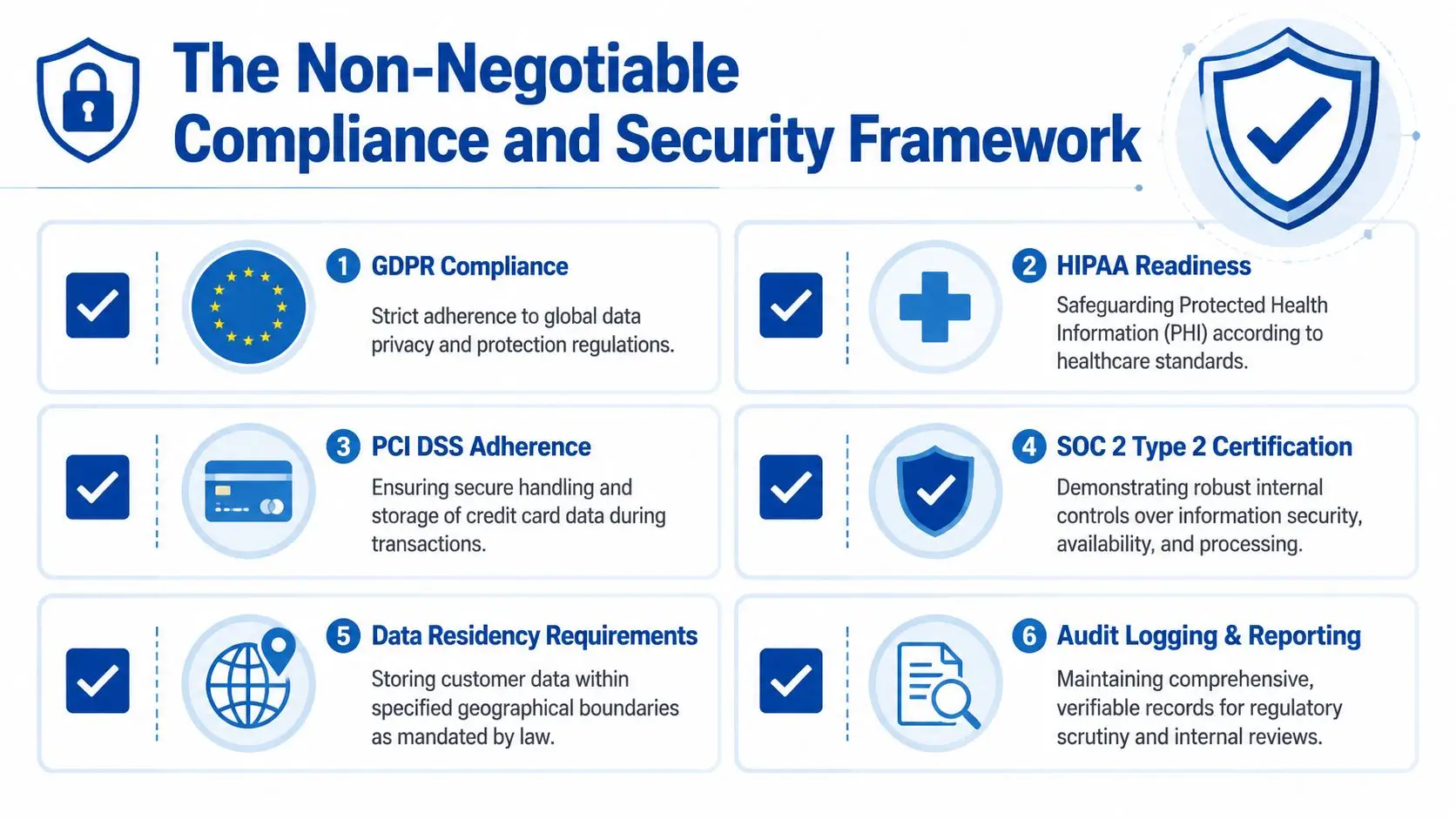
Compliance in a regulated contact center can't sit in policy binders alone. It has to exist in the software logic, the permission structure, the recording controls, and the payment flow.
That's why platform selection should begin with hard requirements, not vendor claims.
If agents take payments, PCI DSS is operational, not theoretical.
According to PCI guidance for call center environments, PCI DSS v4.0 requires call centers to never store sensitive authentication data such as CVV after authorization and requires controls including pause-and-resume for call recordings, tokenization, and end-to-end encryption. A platform that treats payment as a detached add-on makes those controls harder to enforce consistently.
For teams reviewing vendor controls, contact center security requirements should be examined as carefully as dialing and reporting features.
Healthcare contact centers and revenue cycle teams don't just manage balances. They handle protected health information.
That means the software must support encryption in transit and at rest, restricted user authentication and access controls, secure recording and storage practices, staff training workflows, and regular audit readiness. If PHI can be viewed too broadly or moved carelessly between systems, the workflow is already broken before an audit ever happens.
Outbound communication teams often underestimate how much software design affects TCPA exposure.
For marketing messages sent via automatic dialing systems or prerecorded voice, prior express written consent is required. Informational messages may rely on prior express consent, and calls must stay within permitted calling windows, typically 8 a.m. to 9 p.m. in the recipient's local time zone, based on contact center TCPA compliance guidance. The practical takeaway is simple. Consent status, channel rules, and time-zone logic have to be part of the workflow itself.
A platform should support:
“In our industry, a compliance gap isn't a bug. It's a business-ending event.”
That statement sounds severe because the operational consequences are severe. In regulated contact centers, security and compliance aren't modules. They're the standard the rest of the platform has to meet.
Most buyers don't fear the demo. They fear the project plan.
That's reasonable. Contact center teams have seen too many “modernization” efforts drag into long migrations, unclear ownership, messy data mapping, and go-live dates that keep moving. A buyer should assume that if implementation sounds vague, the work will be painful.
A modern platform should connect to systems of record cleanly. That might include a billing system, EHR, servicing platform, proprietary database, payment ledger, or internal CRM. The key isn't whether every possible integration exists on day one. The key is whether there's a clear integration path without custom chaos.
Strong implementation teams usually do three things well:
A buyer should ask direct questions early. How is historical interaction data handled. What happens to open payment arrangements. How are role permissions configured. What does agent training look like. What has to be customized versus configured.
If the answers drift into abstractions, that's a warning sign.
The best implementation plans sound boring. Named milestones, specific owners, defined dependencies, and no mystery steps.
For regulated teams, implementation speed matters because prolonged dual-system periods create their own risk. Agents working across old and new workflows at the same time make more mistakes. A cleaner cutover with disciplined onboarding is usually safer than a long, fuzzy transition.
A credible partner should be able to explain how a deployment can move in days, not weeks of confusion, with minimal downtime and clear accountability from kickoff through go-live.
The financial case for call center CRM software shouldn't rely on generic productivity language. It should be tied to labor efficiency, compliance control, customer retention, and how quickly a team can move from conversation to resolution.
That means measuring both ROI and total cost of ownership.
The broad CRM market offers one important benchmark. According to CRM market analysis, businesses using CRM systems earn $8.71 for every $1 spent, and CRM adoption boosts customer retention by 27%.
In a contact center, those returns don't appear magically. They usually come from a few specific changes:
Many teams underestimate TCO because they only compare license fees.
The bigger cost sits in overlap and workarounds. Separate communication tools, payment tools, reporting layers, and manual QA processes all create hidden administrative labor. So does training agents on several interfaces instead of one. So does maintaining multiple vendor relationships when an issue crosses system boundaries.
A useful business case should examine:
| Cost area | What to evaluate | Why it matters |
|---|---|---|
| Licensing overlap | Multiple tools doing parts of the same job | Redundant spend often hides in “temporary” add-ons |
| Training burden | Number of systems an agent must learn | More systems usually mean slower ramp and more mistakes |
| Compliance exposure | Workflow points where data leaves the core platform | Every gap adds audit and remediation risk |
| Operational drag | Manual steps between contact, documentation, and payment | Friction reduces throughput and resolution quality |
“The biggest gain wasn't one metric. It was removing the pause between customer agreement and payment completion.”
That's the kind of ROI statement operators trust because it reflects real workflow economics. In collections, healthcare billing, insurance, and utilities, cash flow often improves when the path from agreement to action gets shorter and safer. The same goes for service quality. When the system reduces friction, people finish more work correctly on the first try.
A polished demo doesn't answer the questions that matter most in regulated operations. Buyers need to know whether the platform is fully unified, whether payment is native, whether compliance controls are engineered into the workflow, and whether implementation has a realistic path.
One data point should sharpen that review. In regulated industries like healthcare collections, 73% of contact center leaders report that switching between CRM and payment systems causes compliance gaps, yet only 28% of CCaaS platforms offer native, PCI-DSS certified payment flows.
That gap is exactly where weak evaluations go wrong.
When buyers review providers, they should ask for evidence, not promises. Architecture diagrams, process walkthroughs, security documentation, implementation ownership, and payment workflow detail matter more than feature slogans.
For buyers evaluating the range of providers, this overview of contact center providers is a useful starting point for framing the right questions.
| Category | Question to Ask | Why It Matters |
|---|---|---|
| Platform architecture | Is the platform truly unified or assembled from separate acquired or third-party components? | Unified architecture usually means fewer workflow breaks and clearer accountability |
| Payments | Is payment processing native inside the agent workflow, or does it hand off to another system? | Separate payment tools create friction and compliance risk |
| Compliance | Can the vendor show current documentation for PCI controls and explain how HIPAA and TCPA requirements are enforced in workflow? | Compliance claims without workflow detail aren't enough |
| Auditability | Can supervisors and compliance staff reconstruct a full interaction record in one place? | Audit response speed matters when issues arise |
| Permissions | How are role-based access controls handled for agents, supervisors, and administrators? | Sensitive data exposure should be limited by design |
| AI | Is automation trained and embedded in operational workflows, or added through a general-purpose layer? | Weak context leads to poor responses and rework |
| Implementation | What does the first go-live phase include, and who owns each dependency? | A realistic launch plan lowers disruption |
| Integration | What are the standard integration paths to existing CRMs, EHRs, billing systems, and internal databases? | Integration quality determines adoption and long-term cost |
Good vendors answer directly. They can explain where payment data flows, how recording controls behave during payment capture, how consent is tracked, and how quickly core integrations can be configured.
Weak vendors answer with abstractions. They say the platform is flexible, secure, and enterprise-ready, but they can't show the exact workflow.
“Asking whether the provider built the technology or assembled it from outside components usually tells the buyer how many operational surprises are still hidden.”
A buyer in collections, healthcare revenue cycle, financial services, insurance, government, or utilities shouldn't settle for less than operational clarity. The right checklist doesn't just choose a product. It prevents a bad implementation and years of avoidable workaround cost.
Native AI works from the same operational data and workflow logic the contact center already uses. Bolted-on AI often lacks enough account context to act reliably. A 2025 report found that 49% of contact centers struggle with AI agents that lack deep CRM context because they're bolted on from general providers.
It should track consent status at the customer and channel level, apply outreach rules automatically, and enforce local-time calling windows inside the workflow. If agents have to interpret consent manually each time, the process is too fragile.
Yes, when they're connected to the same account logic, documentation, and payment controls as the live-agent workflow. Self-service reduces avoidable agent workload and gives customers a simpler path to resolution.
Intelligent Contacts brings communication and payment into one workflow for regulated contact centers that can't afford compliance gaps. It's a unified contact center and payments platform built in-house for collections, healthcare revenue cycle, financial services, insurance, government, utilities, and higher education. Grace, its AI collection agent, is embedded natively rather than bolted on. Teams get clear integration paths, implementation in days not weeks, and one system for voice, SMS, email, chat, and secure payments. Schedule a Demo or See Your ROI. For direct questions, contact Intelligent Contacts through the website's contact options and speak with a team that understands regulated operations.